
#1 What This State Means
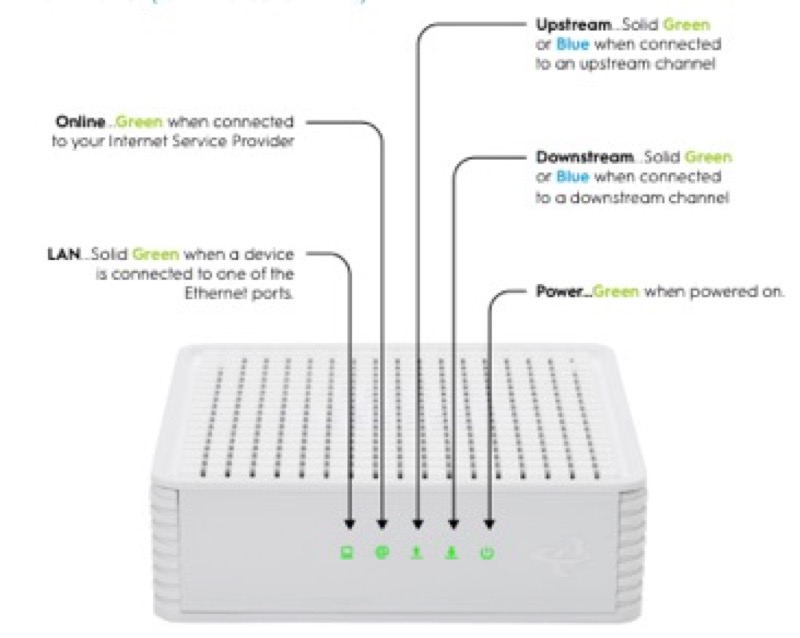
A green light is a working colour on some devices and a different state on others, so “why is it green” depends on the device. On Spectrum’s WiFi 6 router (S02), green is one of the status light’s working colours alongside blue: flashing is booting up, pulsing is connecting to the internet, and solid is connected. On Cox’s XER10 (S31), flashing green is a firmware download in progress. On Cox’s CGM4141 (S32), flashing green is upstream registration, and amber and green flashes together are a firmware download. On Verizon’s CR1000A (S08), solid green means Wi-Fi has been turned off by the user.
So the “why” for green is the state the device is in. On Spectrum, green is a start-up or connection state, and a steady green means the router is connected. On the Cox devices, green is a download or a registration step, and the table gives no action for it. On Verizon, green is not a start-up light: it means the Wi-Fi was switched off, and the light returns to white when Wi-Fi is back on.
This page covers Spectrum’s WiFi 6 router, the Cox XER10 and CGM4141, and the Verizon CR1000A. The CGM4331 states only solid white, so it is not covered for green.
#2 Why it is green, by device
| Device | Green pattern | Why, per the source | Action |
|---|---|---|---|
| Spectrum WiFi 6 router | Flashing green | Booting up | Wait for it to finish |
| Spectrum WiFi 6 router | Pulsing green | Connecting to the internet | Give it time |
| Spectrum WiFi 6 router | Solid green | Connected to the internet | Nothing to fix on the router |
| Cox XER10 Panoramic router | Flashing green | Firmware download in progress | None given; do not unplug |
| Cox CGM4141 gateway | Flashing green | Upstream registration | None given; wait |
| Cox CGM4141 gateway | Amber and green flashes | Firmware download in progress | None given; do not unplug |
| Verizon CR1000A | Solid green | Wi-Fi has been turned off | Turn Wi-Fi back on in the settings |
The table keeps each device’s green separate. Green is a start-up or download on Cox and Spectrum, and a Wi-Fi-off state on Verizon.
#3 Steps when a green light shows
- Identify the device. Read the label, since green means different things on each device.
- Note the pattern. Solid, flashing, pulsing, or amber and green flashes, as the table lists them.
- For Spectrum, read the state. Flashing is booting, pulsing is connecting, and solid is connected.
- For Cox, decide whether it is a download or registration. Flashing green on the XER10 is a download, and on the CGM4141 it is upstream registration.
- Do not unplug a Cox device during a download. The table describes it as a step in progress, so let it finish.
- For Verizon solid green, check the Wi-Fi setting. The chart says Wi-Fi is off, so turn it back on in the router’s settings.
- Contact the provider if the green does not match its table. Give the model, the pattern, and how long it has lasted.
#4 What If Scenarios
Q: Why is my router green and flashing? On Spectrum, flashing green or blue is the router booting up, and it should finish on its own. On Cox’s XER10 flashing green is a firmware download, and on the CGM4141 it is upstream registration.
Q: Why is my Verizon router solid green? Verizon’s CR1000A chart says solid green means Wi-Fi has been turned off. Turn Wi-Fi back on in the router’s settings, and the light returns to solid white.
Q: Is solid green good on Spectrum? Yes. On the Spectrum WiFi 6 router, solid blue or green means connected to the internet.
Q: Why is my Cox gateway flashing green for a long time? Cox’s tables give no time limit and no action for flashing green. Let the download or registration finish, and check the coax if it does not reach solid white.
Q: My router is a different brand or model. Does this apply? Not as far as these sources show. Use that brand’s table or contact the provider.
#5 Related Articles
For the Spectrum green states, read the Spectrum router blinking green guide. For the Cox green states, read the Cox router blinking green guide. For the Verizon Wi-Fi state, read the Verizon router Wi-Fi light blinking guide.