
#1 What This State Means
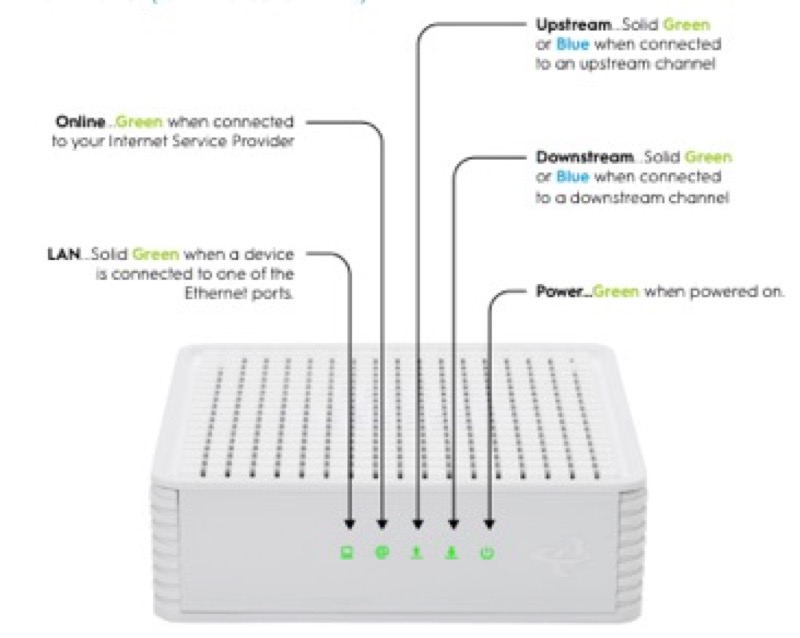
A green light with no internet is a combination the sources on this site describe only in part. Spectrum’s WiFi 6 manual (S02) says the status light is blue or green, so green has the same meanings as blue: flashing is booting, pulsing is connecting, and solid is connected to the internet. A solid green light therefore says the router is connected, and a green light that is only pulsing or flashing says it is still connecting. Neither reading names a no-internet state for green.
Cox’s tables show the same gap from the other side. On Cox’s XER10 (S31), solid red is no internet connectivity, and on the CGM4141 (S32), flashing green is upstream registration and solid red is offline. So a green light on Cox’s CGM4141 can be a registration step, and the table does not treat green as the no-internet state. If the devices have no internet while the light is green, the table does not say why, so check the connection rather than the colour.
The page covers the Spectrum WiFi 6 and the Cox XER10 and CGM4141 only. The CGM4331 states only solid white, and the TG1682G and CGM4140COM are not covered.
#2 Green and the no-internet state
| Device | Green pattern | What the table says | What it does not say |
|---|---|---|---|
| Spectrum WiFi 6 router | Solid green | Connected to the internet | Nothing about no internet |
| Spectrum WiFi 6 router | Pulsing or flashing green | Connecting, or booting | Nothing about no internet |
| Cox XER10 Panoramic router | Flashing green | Firmware download in progress | Nothing about internet |
| Cox CGM4141 gateway | Flashing green | Upstream registration | Nothing about internet |
| Cox XER10 or CGM4141 | Solid red | No internet connectivity (XER10) or offline (CGM4141) | The red state is the no-internet state, not green |
The no-internet state is the red state on Cox, not green. On Spectrum, a red pulse is the connectivity issue, so green is never the no-internet state in these sources.
#3 Steps when green shows and the internet is down
- Read the green against the table. Solid green on Spectrum is connected, and flashing or pulsing green is a connecting or booting step.
- Test the internet on a device. Confirm it is actually down before you change anything.
- If the green is pulsing or flashing, wait for it to settle. A connecting or registration step can finish on its own.
- If the green is solid on Spectrum and the internet is down, check the devices and the modem. The router shows connected, so compare a device on Wi-Fi with one on a wired connection to see where the problem is.
- Check the cable. Cox’s tables ask you to verify the cable connections for a connection problem, so check the coax at the wall and at the gateway, and the cable from the modem to the router.
- Check for an outage in your area. An outage can stop the internet while a light still shows connected.
- If the light turns red, use the red guidance. On Spectrum a red pulse is a connectivity issue, and on Cox solid red is no internet or offline.
- Contact the provider if the internet stays down. Give the model, the green state, which devices fail and what you have already checked.
#4 What If Scenarios
Q: My Spectrum router is solid green but the internet is down. Is the router broken? Not on the manual’s reading. Solid blue or green means the router is connected to the internet, so check the devices, the modem and any outage before you replace anything.
Q: My Cox CGM4141 is flashing green and the internet is down. What now? Flashing green is upstream registration in Cox’s table, with no action. Wait for it to finish, and if the light does not reach solid white, check the cables and contact Cox.
Q: My XER10 router is flashing green. Is that a download? On the XER10, flashing green is a firmware download in progress, and Cox gives no action for it. Do not unplug the router, and wait for the download to finish.
Q: Is green ever the no-internet light on these devices? Not in the sources here. On Cox, the no-internet state is solid red, and on Spectrum a red pulse is the connectivity issue.
Q: My router is a different brand or model. Does this apply? Not as far as these sources show. Use the table for your own brand, or contact the provider.
#5 Related Articles
For the Spectrum green states, read the Spectrum router blinking green guide. For the Cox red state, read the Cox router red light guide. For the Cox green states, read the Cox router blinking green guide.