
#1 What This State Means
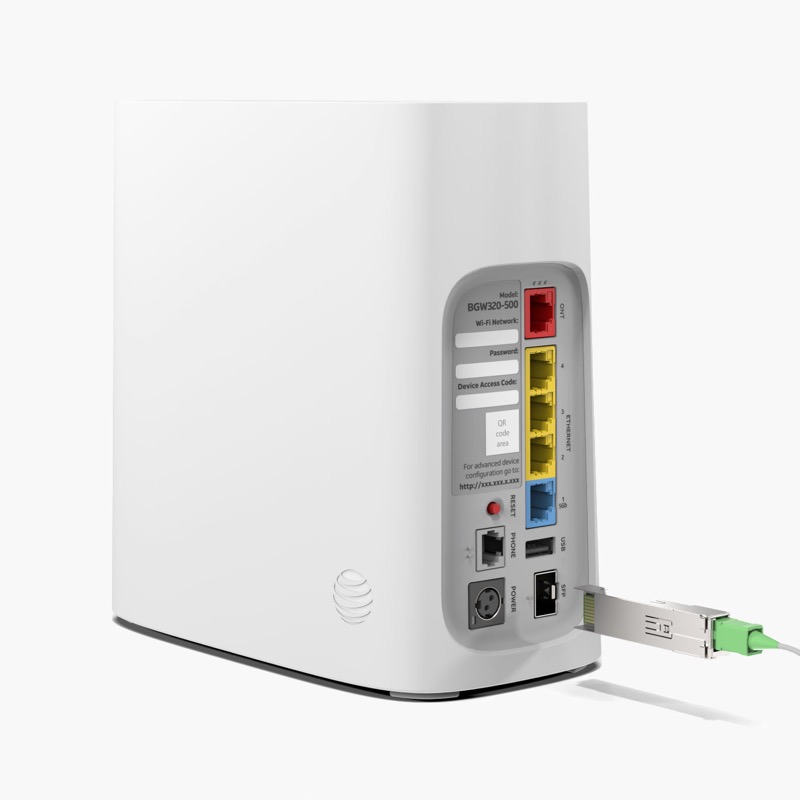
A blinking red light on an AT&T gateway usually points to a broadband or service problem, but the exact meaning depends on the model and on which light is blinking. The page covers three AT&T gateways that AT&T lists for its Smart Home Manager app: the BGW320, the BGW210 and the BGW620. Only the BGW320 has a blinking red legend in the sources we checked. The BGW210 guide covers its Power and Service lights, but not a blinking red state.
For the BGW320, AT&T’s “What Do the Lights Mean?” guide says a fast blinking red Service light is a network service issue that may be momentary, and a slow blinking red Service light means no broadband connection. For the BGW210, AT&T’s BGW210 guide documents the Power and Service lights but not a blinking red state. For the BGW620, the sources we checked do not include a light legend. That does not mean their lights are the same. Do not apply the BGW320 table to them.
So the first job is to identify the model, then choose the right guide. If you have a BGW320, use the BGW320 light legend. If you have a BGW210 or BGW620, use the steps in this page and AT&T’s support for that model.
#2 Identify your gateway
- Read the model on the label. Find the label on the gateway and note the model, such as BGW320, BGW210 or BGW620.
- Check the Smart Home Manager app, if you have it. AT&T’s restart article says the app can show the gateway type and any internet connection problem when you sign in.
- Use the model’s own guide. For a BGW320, the light legend applies. For other models, AT&T’s support pages for that model are the reference.
#3 Steps to Troubleshoot
- Note which light is blinking red, and how fast. Check the front Service light and the WPS light separately. Fast and slow blinking are different states on the BGW320.
- Check for an outage. Use Smart Home Manager or myAT&T on a mobile device to look for a service problem in your area.
- Check the cable. Look for a loose, disconnected or damaged cable at the wall and at the gateway. Reseat it firmly and watch the light.
- Restart the gateway. AT&T’s manual restart is to unplug the power cord, wait 20 seconds, and plug it back in. If the gateway has an internal battery backup, remove it during the restart and put it back afterwards, as the AT&T guide describes. The gateway can take up to five minutes to come back online.
- Use Smart Home Manager for a restart, if you prefer. Open the app, select Network, choose Restart Wi-Fi and select Restart again.
- Wait the full five minutes. Devices disconnect during a restart, so judge the light only after it has settled.
- Contact AT&T if the red light stays. Give the model, which light is red, whether it is fast or slow, and what you have already checked.
#4 What If Scenarios
Q: The BGW320 Service light is blinking red fast. Is the gateway broken? Not necessarily. AT&T says fast blinking red on the Service light is a network service issue that may be momentary. Check for an outage, restart once, and contact AT&T if the light stays red or the internet stays down.
Q: The BGW320 Service light is blinking red slowly. What does that mean? AT&T says slow blinking red means the gateway has no broadband connection. Check the cable first, then restart. Do not reset the gateway to fix a slow red light until you have checked the cable and restarted.
Q: My BGW210 is blinking red. Does the BGW320 legend apply? No. The BGW320 legend is specific to that model. AT&T’s BGW210 guide does not describe a blinking red state, so check for an outage, check the cable, and restart. If the Service light is red or off after five minutes, the guide says to power the gateway down.
Q: My BGW620 is blinking red. What is the first step? Check the cable and any outage, then restart the gateway with the manual method or Smart Home Manager. The sources we checked do not give a BGW620 light legend, so contact AT&T if the light does not settle.
Q: Can I reset the gateway to fix the red light? Only by following AT&T’s current reset instructions. AT&T’s documents disagree on the BGW320 reset hold duration, so this page gives no number. A reset removes your Wi-Fi settings, so do not reset until the simpler checks have failed.
Q: Why are all my devices offline during a restart? AT&T’s restart article warns that restarting the gateway or hub disconnects every device from the internet or Wi-Fi, and that it can take up to five minutes for the gateway to come back online and devices to reconnect. That is expected, so do not judge the light or the connection until the five minutes have passed.
#5 Related Articles
For the full BGW320 light legend, read the AT&T BGW320 light meanings guide. For the BGW320 red states, read the AT&T BGW320 blinking red guide. For the difference between restart and reset, read restart or factory reset.