
#1 What This State Means
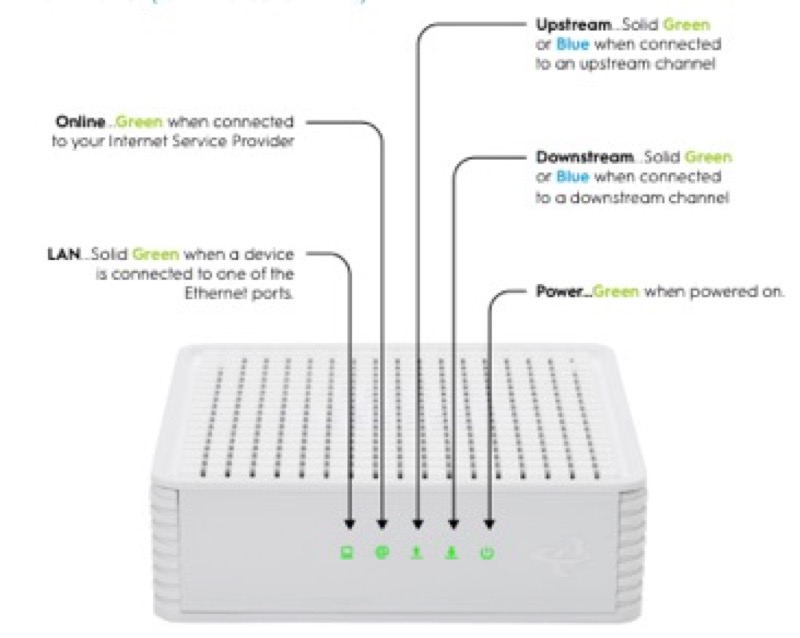
A router’s light colour means different things depending on the brand, and the sources on this site give colour meanings only for some brands. There is no single colour code that holds across routers. So the first question is not what colour you see, but which brand’s table it belongs to, because the same colour can be a boot step on one device and a fault on another.
Across the sources, the colours tend to group in a few ways, and each group is documented only for its device. White is the healthy colour on Cox’s XER10 and CGM4141 (solid white is online) and on Verizon’s CR1000A (solid white is normal operation), and it is the starting-up colour on the Verizon chart (fast blinking white). Blue or green on Spectrum’s WiFi 6 router is the status light’s working colour: flashing is booting, pulsing is connecting, and solid is connected. Amber on Cox is the boot, and on Cox’s CGM4141 flashing amber is downstream registration. Red is the fault colour on Cox (no internet or offline) and on Verizon, and on Spectrum a red pulse is a connectivity issue.
So a colour is a clue, not a diagnosis. Read the colour together with its pattern and the brand, and then use that brand’s table.
#2 Colours by brand
| Colour | Spectrum WiFi 6 router | Cox XER10 | Cox CGM4141 | Verizon CR1000A |
|---|---|---|---|---|
| White | Not stated | Solid: online | Solid: online | Solid: normal; fast blinking: boot or restart |
| Blue | Blue or green: booting, connecting, connected | Not stated | Flashing: WPS mode | Slow blinking: WPS pairing; fast blinking: WPS success |
| Green | Blue or green (same states) | Flashing: firmware download | Flashing: upstream registration | Solid: Wi-Fi off |
| Amber | Not stated | Solid: boot; flashing: IP acquisition | Solid: boot; flashing: downstream registration | Not stated |
| Red | Pulsing: connectivity issue; red with blue or green: firmware update; red with white: overheating | Solid: no internet connectivity | Solid: offline | Red states conflict between sources |
The table shows that the same colour can be a state on one device and absent on another. Where a cell says “Not stated”, the sources do not give that colour for that device.
#3 Steps to read a colour
- Identify the brand and device. Read the model on the label, and find its row in the table.
- Read the colour and the pattern together. Solid, flashing and pulsing change the meaning on several devices.
- Use that brand’s table for the meaning. Do not use another brand’s row for the same colour.
- If the colour is not stated, do not assume a meaning. The sources do not give it, so contact the provider.
- For a red colour, check the connection and contact the provider. Red is the fault colour on several devices, and the Verizon sources disagree on the red states.
#4 What If Scenarios
Q: My router light is white. Is that good? On Cox’s XER10 and CGM4141, solid white is online, and on Verizon’s CR1000A it is normal operation. Fast blinking white on Verizon is a boot or restart. Read the pattern.
Q: My router light is blue. What does that mean? It depends on the brand. On Spectrum’s WiFi 6, blue is the status light’s working colour: flashing is booting, pulsing is connecting, and solid is connected. On Cox’s CGM4141, flashing blue is WPS mode. On Verizon’s CR1000A, blue is WPS pairing. On Cox’s XER10 blue is not stated.
Q: My router light is amber. Is it a fault? Not on Cox’s tables. Solid amber is the boot, and flashing amber is IP acquisition on the XER10 or downstream registration on the CGM4141. Amber is not stated for Spectrum or Verizon.
Q: My router light is red. Is it broken? Red is the fault colour on Cox and Verizon’s charts, but the Verizon sources disagree on which red state is which. On Spectrum a red pulse is a connectivity issue. Check the connection and contact the provider with the pattern.
Q: My router is a brand not listed here. What should I do? The sources do not cover it. Use that brand’s own light table, or contact the provider.
#5 Related Articles
For the Spectrum WiFi 6 lights, read the Spectrum WiFi 6 router lights guide. For the Cox device tables, read the Cox gateway lights by device guide. For the Verizon CR1000A chart, read the Verizon CR1000A light meanings guide.