
#1 What This State Means
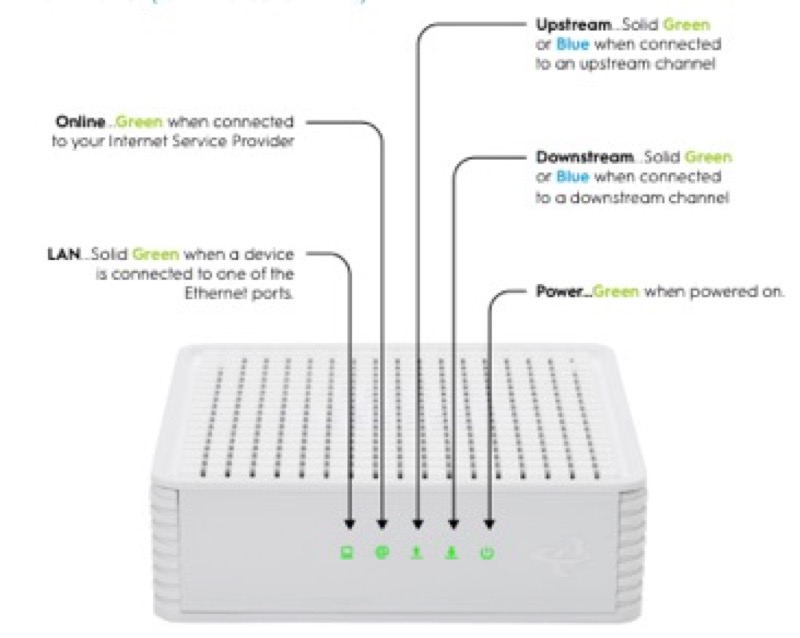
A flashing power light is the one state this page cannot answer from the sources. The Spectrum WiFi 6 manual (S02) has a single front status light and no separate power light, so there is no documented power light to flash. The Cox tables (S31, S32) describe the power-related state as off, which means no power, or Power Save Mode on the CGM4141, and they describe solid amber as the boot. Neither source gives a flashing power light, and the Verizon CR1000A guide (S08) gives its power state as off only.
So a flashing light on or near the power point is not a documented power state. If it is the boot, it may be a flashing status light during start-up: on Spectrum that is the flashing blue or green boot, and on Cox the boot is solid amber. Read the light against the table for your brand, and if it is not part of the boot, the sources do not say what it means.
This page covers the Spectrum WiFi 6 router, the Cox XER10 and CGM4141, and the Verizon CR1000A, as the sources describe them. Other devices are not covered.
#2 Power and boot states by brand
| Brand and device | Power-related state | Boot state | Flashing light |
|---|---|---|---|
| Spectrum WiFi 6 router | No separate power light; off means the device is off | Flashing blue or green while booting | Booting, if on the status light |
| Cox XER10 Panoramic router | Off means no power | Solid amber while booting | Not a power state in the table |
| Cox CGM4141 gateway | Off means off or Power Save Mode | Solid amber while booting | Not a power state in the table |
| Verizon CR1000A | Off means powered off | Fast blinking white for a restart | Booting or restarting, per the guide |
Each row shows what the table says the power state is, and what it says the flashing state is. The flashing state is never a power state in these sources.
#3 Steps when a power light flashes
- Identify the brand and the light. Note which light is flashing, and whether it is the front status light or a separate power light.
- Check whether the device is booting. A flashing status light during start-up is the boot on Spectrum and Verizon, and solid amber is the boot on Cox.
- If it is the boot, wait for it to finish. Each brand’s table gives no action for the boot state.
- If the light is off, check the power. Off means no power on the XER10 and the CGM4141 (or Power Save Mode on the CGM4141), and powered off on the CR1000A, so check the cord and outlet.
- Check that the outlet is not switched. Cox’s XER10 table asks you to make sure the outlet is not connected to a switch.
- If the flashing continues after the boot, contact the provider. The sources do not say what a flashing power light means outside the boot, so give the provider the model and the light’s pattern.
#4 What If Scenarios
Q: The power light on my router is flashing. Is the power supply failing? The sources do not describe a flashing power light, so they do not say the supply is failing. Check the cord and the outlet, and contact the provider if the flashing is not part of the boot.
Q: My Spectrum router has no power light. Where do I look? The Spectrum WiFi 6 manual describes one front status light and no separate power light. Use the status light, and check that the device is on.
Q: My Cox gateway power state is off. Is it dead? Not necessarily. Off means no power on the XER10, and off or in Power Save Mode on the CGM4141. Check the outlet and cord first, and see whether the Power Save Mode applies to the CGM4141.
Q: My Verizon router light flashes white on start-up. Is that the power? Verizon’s CR1000A guide gives fast blinking white as the boot or system restart, not as a power state. Let the start-up finish.
Q: My router is a different brand or model. Does this apply? Not as far as these sources show. Use the table for your own brand, or contact the provider.
#5 Related Articles
For the Cox power and boot states, read the Cox power light blinking guide. For the Spectrum status light, read the Spectrum WiFi 6 router lights guide. For the Verizon start-up, read the Verizon router blinking white guide.