
#1 What This State Means
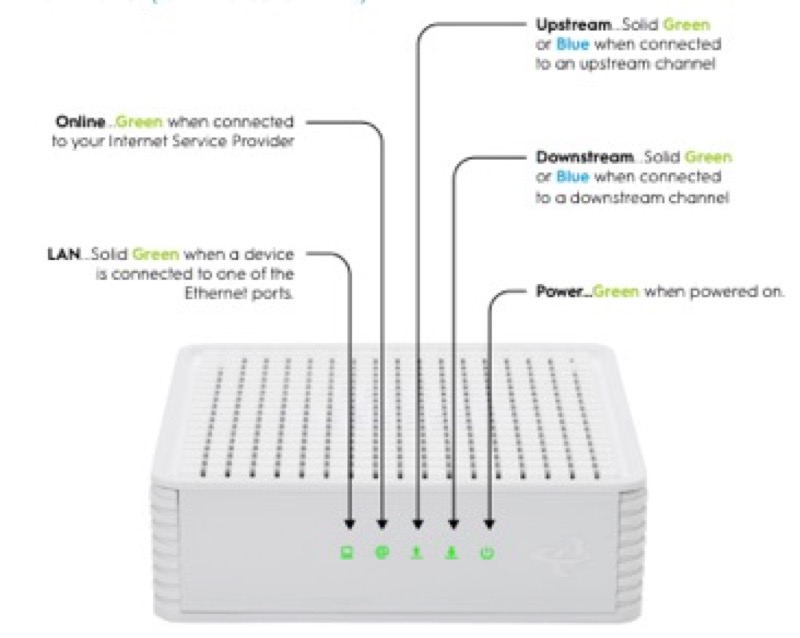
Modem lights are a separate matter from router lights. A modem is the box that connects your home to the cable network, and its lights show the cable connection, not the Wi-Fi. Spectrum’s public modem-light page (S03) defines the labels on its modems and gateways. That page is general, and it is not tied to one model, so it tells you what each label means in Spectrum’s terms without saying which lights your model has.
The main labels are these. Power (PWR) shows AC power is available, and on some modems a blinking power light means startup diagnostics are running. US is on when the internet is available and you can send, or are sending, data. DS is on when the internet is available and you can receive, or are receiving, data. Cable Link is on when registration is complete and the gateway is operational, and blinking when it is going through startup and registration. Online is on when the internet is available. Diag is on or blinking when the gateway might be malfunctioning, and Spectrum asks you to contact it.
Read the labels together, because the cable connection shows in several of them. A modem with Cable Link on, and US and DS on, is connected and working. A modem with Cable Link off has no cable connectivity, and the other labels will not help until that is fixed.
#2 Modem labels, per Spectrum’s page
| Label | When it is on | When it blinks or is off |
|---|---|---|
| Power (PWR) | AC power is available | Some modems blink during startup diagnostics; off means no AC power |
| US (upstream) | The internet is available, and the modem is sending data | Not defined on Spectrum’s page |
| DS (downstream) | The internet is available, and the modem is receiving data | Not defined on Spectrum’s page |
| Cable Link | Registration is complete, and the gateway is operational | Blinking: startup and registration; off: no cable connectivity |
| Online | The internet is available | Not defined on Spectrum’s page |
| Diag | Might be malfunctioning; contact Spectrum | Blinking: might be malfunctioning; off: functioning normally |
The page is general. It does not say which labels your model has, so check the label and manual on your modem before you rely on a particular light.
#3 Steps to read a modem’s lights
- Read the Power light first. AC power should be available. If it is off, check the cord and the outlet.
- Read Cable Link. On is registration complete. Blinking is startup and registration, which should finish. Off means no cable connectivity.
- Check the coax cable. Spectrum’s page says the modem is connected via the coax cable, so make sure it is firmly connected at the modem and the wall.
- Read US and DS together. Both on means data is moving over the cable connection.
- Check the Diag light. If it is on or blinking, Spectrum’s page says to contact Spectrum.
- Check for an outage in your area. An outage can turn off Cable Link and stop US and DS.
- Contact Spectrum if the lights do not match. Give the modem model from the label, which lights are on, off or blinking, and what you have already checked.
#4 What If Scenarios
Q: My modem Cable Link light is blinking. Is it broken? Not on Spectrum’s page. A blinking Cable Link means the gateway is going through startup and registration, which should finish. Give it time before you act.
Q: The Cable Link light is off. What does that mean? Spectrum’s page says off means there is no cable connectivity. Check the coax at the modem and the wall, and check for an outage.
Q: The Diag light is blinking. Should I restart the modem? Spectrum’s page says that if Diag is on or blinking, the gateway might be malfunctioning, and it asks you to contact Spectrum. Check the power and the coax, then contact Spectrum rather than relying on repeated restarts.
Q: My modem is not a Spectrum modem. Does this page apply? Spectrum’s page covers Spectrum’s modems and gateways, and it is general. For another brand’s modem, use that brand’s own labels and manual.
Q: My WiFi router light is not on this page. Why? Spectrum’s modem-light page covers modems and gateways. For the Spectrum WiFi 6 router, use the WiFi 6 router lights guide.
#5 Related Articles
For the US and DS labels in detail, read the Spectrum modem US and DS lights guide. For the Online and Cable Link states, read the Spectrum modem online light blinking guide. For a router with every light on, read the Spectrum modem all lights on guide.